THE SHORT ANSWER
What should you know first?
An effective architect’s automation brief connects household routines to room layouts, lighting, controls, curtains, networking and equipment access. Assign each decision to a responsible professional, track drawing revisions and define acceptance and handover. The planning brief describes the outcome; qualified professionals produce and approve the technical design.
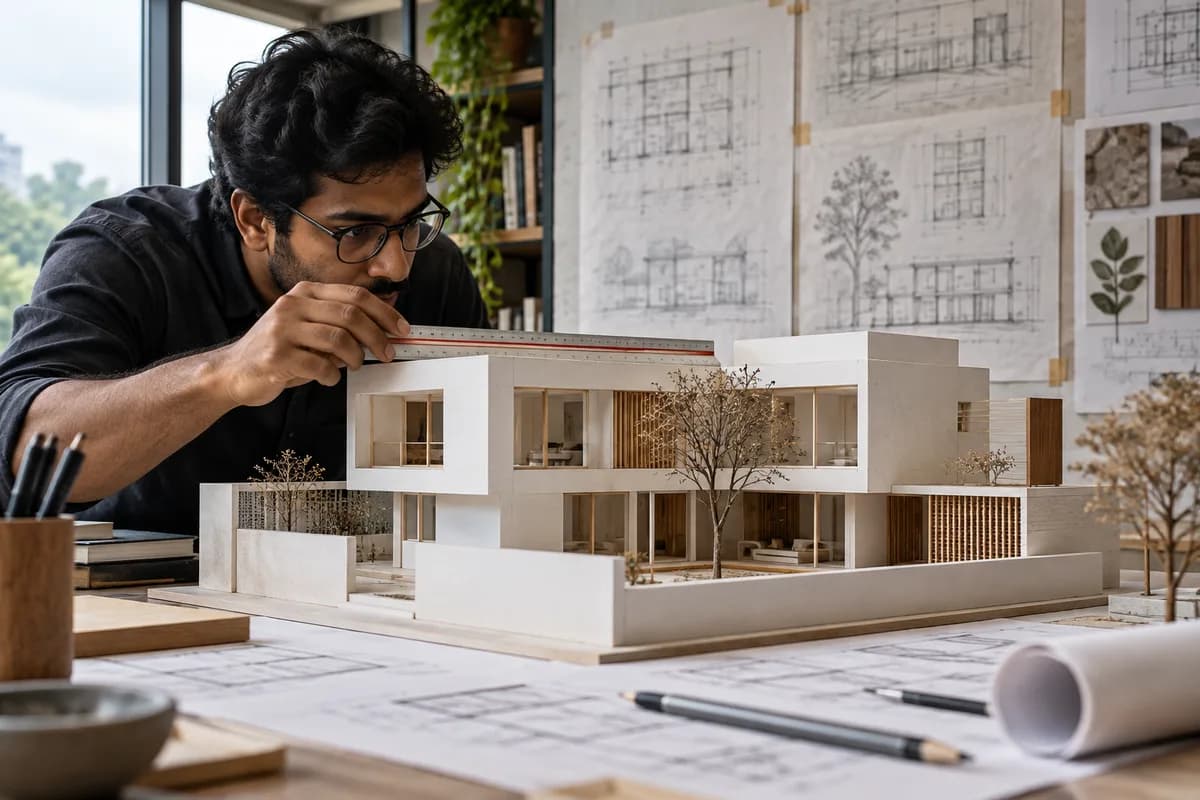
Describe routines before selecting panels
Start with how each space will be used: reading, entertaining, sleeping, arriving home or working. Turn those routines into a short functional brief. The design team can then discuss controls and equipment around the room's actual purpose.
Keep the brief shared between the homeowner, architect, electrical contractor and integrator. A single current document helps prevent different teams from making conflicting assumptions.
Mark the decisions that affect other trades
Wall controls need agreed positions and mounting heights. Curtain tracks need coordinated dimensions and access for maintenance. AV equipment may need space, ventilation and cable routes. Treat these as design conversations before finishes are ordered.
- Room-by-room lighting circuits and desired scenes.
- Curtain or blind locations and motor access.
- Wall panel locations coordinated with furniture and joinery.
- Network and equipment cabinet locations with service access.
- Responsibility for drawings, installation and final configuration.
Plan the review points
Agree when the automation professional must review the electrical and reflected ceiling plans. Record changes in one place and ask each affected trade to acknowledge them. Avoid signing off a design on the strength of an unlabelled product mood board.
Ask for a sample room or demonstration before repeating an approach throughout the home. Check usability with the people who will live there, including family members who prefer physical controls.
Specify the handover
Include the final drawings, model list, warranty documents, account ownership and relevant configuration backups in the scope. Agree who trains the household and who resolves issues that cross electrical, networking and automation work.
Nexoforma accepts enquiries from homeowners and applications from architects, designers and integrators in India. The initial request is for Nexoforma to contact you; your details are not automatically distributed to other businesses.
What should an automation brief tell the design team?
An automation brief should describe how the household wants each space to behave and identify the decisions that affect architecture, interiors, electrical work and technology. It is not a shopping list of panels. A useful brief explains the room, the activity, the preferred way to operate it and any important exception. For example, a bedroom night routine might need gentle lighting and a familiar physical control without requiring someone to find a phone.
Keep user outcomes separate from technical implementation. The homeowner can describe a desired scene, while qualified professionals determine the equipment, wiring and programming needed to deliver it. This distinction helps each person contribute within their role. It also prevents an early product preference from becoming an unexamined design constraint when the household's underlying need could be met in another way.
Use one current version of the brief. Give it a date, revision identifier and owner responsible for consolidating changes. The architect, interior designer, electrician, lighting designer and integrator may each work from different drawings, so the brief should point to the current relevant revisions. A shared folder is useful only when people can identify which documents are approved and which are still being discussed.
How do you turn daily routines into room requirements?
Walk through an ordinary day rather than imagining only special occasions. Think about waking, dressing, working, cooking, relaxing, hosting and going to sleep. For each room, note the actions that happen repeatedly and the controls people already understand. This produces a practical starting point for scenes and control locations. It can also reveal that some rooms need very simple operation despite an ambitious whole-home concept.
Include the people who will actually use the property. Children, older family members, guests and household staff may interact with different parts of the system. Ask which actions should remain obvious without an explanation. Accessibility is specific to the users and the design; do not assume a touchscreen or voice assistant automatically makes a home easier to use. Request demonstrations of the proposed interaction before repeating it across rooms.
Record exceptions alongside the normal routine. Someone may want to read while another person sleeps, or a guest may need independent control in a spare room. A scene that is convenient for one person can be intrusive for another if it changes shared lights or curtains unexpectedly. These conversations belong in the brief because they shape how controls are grouped and how overrides should behave.
Which drawings and schedules should be coordinated?
Ask the project team to identify the drawings required for its actual scope. They may include room layouts, electrical plans, lighting circuit schedules, reflected ceiling plans, control locations, curtain details, network points and equipment-cabinet arrangements. The automation brief should reference these documents rather than pretend to replace them. The appropriate professionals remain responsible for preparing and approving technical designs.
Create a room schedule that connects the drawings to everyday functions. A row can identify the room, controlled load or activity, desired behaviour, physical control location, relevant drawing and responsible trade. Use consistent room names across the quotation, drawings and programming discussion. If one supplier calls a space lounge and another calls it living room, resolve the naming before equipment labels and app screens are created.
Keep assumptions visible when a drawing is incomplete. A provisional panel location or unresolved curtain detail should carry an owner and a date for resolution. Do not allow a neat presentation sheet to hide decisions that are still open. The purpose of coordination is to identify dependencies before they become rework, not simply to collect more documents in a folder.
How should wall controls relate to furniture and circulation?
Discuss control locations with the furnished plan in view. Door swings, bedside tables, wardrobes, wall finishes and circulation can affect whether a control is convenient or obscured. Ask users to imagine approaching the room and reaching for the intended function. A location that looks balanced on an elevation may be awkward during daily use if furniture or an open door blocks it.
Agree the visible control hierarchy. The household should understand which control is for an everyday action and which screen or app is for more detailed adjustments. Avoid assuming that more functions on one panel always improve usability. A consistent set of meaningful actions can be easier to learn than a large number of gestures whose purpose is undocumented.
Use a mock-up where design uncertainty is significant. A paper layout, sample panel or demonstration room can help the family and designers discuss size, contrast, labelling and reach. The mock-up does not certify electrical suitability or installation dimensions. It is a way to resolve interaction and visual decisions before the technical team finalises the relevant details.
What must lighting coordination resolve?
Start with lighting intent: which areas support reading, work, circulation, relaxing or display. Then connect that intent to the actual luminaires, drivers and circuits selected by the design team. Ask the responsible professionals to confirm how the proposed controls will operate those loads. A generic label such as dimmable or smart lighting does not replace compatibility review for the installed combination.
Request a clear scene schedule. Each scene should describe the intended result and the rooms or groups it affects. For instance, an evening scene might use selected lighting groups while leaving a task area independently adjustable. Avoid defining every scene solely as a fixed percentage before the lighting has been evaluated in context. The commissioning process should allow the agreed design intent to be assessed in the finished space.
Discuss the boundary between lighting design and automation programming. Who approves the lighting effect, who adjusts control behaviour, and who investigates a problem such as flicker or an unexpected response? Keep those responsibilities visible. The DALI Alliance's certification information is a useful official reference when relevant products are proposed, but a standards label does not substitute for the project's actual equipment schedule and professional assessment.
How should curtains, blinds and joinery be planned together?
Identify the mechanical arrangement before treating curtain control as an app feature. Track lengths and shapes, curtain weight, motor access, ceiling pockets, power provision and the intended user operation all affect the discussion. Ask the curtain supplier and integrator to confirm the interface they are pricing. The designer should understand any resulting space or access requirements before joinery and ceiling details are approved.
Maintenance access should be drawn and explained. A motor or connection that can be reached only by dismantling finished joinery may create an avoidable ownership problem. Ask who is responsible for the access detail and how a replacement would be carried out. The answer should be based on the selected system, not a broad assumption that all motors or tracks can be serviced in the same way.
Consider the relationship between manual and automated use. The household may want a local control, a scene, a schedule or another method. Ask which behaviours are supported and what happens when a person operates the curtain outside the scene. Document the desired outcome so the programming discussion remains connected to the room's actual use rather than only to the capabilities shown in a product demonstration.
Where should network and AV equipment live?
Allocate equipment space with service access in mind. Ask the specialist to explain the proposed devices, cabling, power needs, ventilation requirements and access clearances for the selected equipment. Avoid treating a cabinet as leftover storage space once the interiors are complete. Its location and design should support the real installation and maintenance process described by the professionals.
Coordinate audio and television requirements with the room layout. Seating position, screen location, furniture, decorative surfaces and cable access can affect the proposed arrangement. Request dimensions and installation guidance for the exact products before finalising joinery. A generic soundbar opening or equipment shelf may not suit every model, even when two products belong to the same brand or category.
Keep network planning distinct from internet speed. Ask where wired connections and access points are proposed, which systems depend on them and who configures the network. The automation brief does not need to prescribe technical settings, but it should name the person responsible for those decisions and the functions the network must support. This prevents a late assumption that the household's existing router will resolve every requirement.
What privacy and account decisions belong in design coordination?
Discuss who needs access to which functions. A homeowner, temporary guest, maintenance professional and remote support technician may require different permissions. Ask the supplier how the proposed system handles those roles and what the owner can revoke. This is a functional question about the selected products, not a general promise that every smart-home platform offers identical access controls.
For cameras, microphones or remote access, identify the actual purpose before choosing placement or enabling features. Consider the people using the space and avoid unnecessary collection or sharing of private information. Ask an appropriate adviser about obligations specific to the property and use case where needed. Nexoforma's planning content does not certify legal compliance or approve a surveillance design.
Record account ownership and recovery responsibilities in the handover requirements. Keep login credentials out of shared drawings and open project chats. If the integrator needs temporary access for commissioning, agree how that access is reviewed at completion. Good coordination includes the ownership of the finished system as well as the location of its visible hardware.
How do review gates prevent late changes?
Define a small number of meaningful sign-offs. An initial functional brief can establish room outcomes. A coordinated design review can resolve infrastructure and control locations. A sample review can confirm usability and finishes. A procurement review can confirm exact models and quantities. The project's professionals should determine the sequence and detail appropriate to the actual work; the point is to make dependencies explicit.
At each gate, record what is approved and what remains open. Avoid treating attendance at a meeting as approval of every document discussed. A concise decision log can identify the item, decision, owner, affected drawings and follow-up date. Share the updated record with the trades whose work depends on it. This provides a more reliable baseline than several separate conversations with inconsistent assumptions.
When a change arrives after sign-off, assess its consequences before approving it. A different lighting fitting or a revised wardrobe may affect controls, cabling, access and appearance. Ask for a clear explanation of the cost and programme implications. Change control is not intended to prevent reasonable improvements; it helps the owner make an informed decision about them.
A sample coordination brief for one room
Consider an illustrative bedroom used by two people with different sleeping times. The desired outcome is independent reading light, simple general lighting, agreed curtain control and a night routine that does not disturb the other person. The brief identifies the bed position and doorway, notes that both users prefer physical controls, and asks the professionals to propose a consistent arrangement. It does not specify wiring or claim that a particular product is already suitable.
The architect checks the furniture layout and available wall area. The lighting professional identifies the intended lighting groups and equipment. The electrical professional reviews the installation requirements. The integrator maps the agreed actions to the chosen control system. The curtain supplier confirms the mechanical details and interface. Each decision is connected to the same room name and current drawing revision.
Before the approach is repeated in other bedrooms, the household reviews a sample or demonstration. It checks whether each person understands the controls and whether the shared scene affects the correct loads. Any change is added to the brief, quotation and commissioning schedule where relevant. The example illustrates coordinated responsibilities; it is not a completed Nexoforma project or a site-ready design.
What should an acceptance and handover checklist contain?
Build acceptance around the agreed room outcomes. List the routines to demonstrate, the physical controls to try and the exceptions that matter to the users. Ask the professionals to plan any outage or recovery demonstrations safely and explain expected behaviour. Keep the test scope specific: internet availability, local networking and electrical supply are different conditions and should not be combined into one vague reliability claim.
Record the documents the owner expects to receive. These can include the installed model list, final relevant drawings, warranty records, scene schedule, support contacts and available configuration backups. Specify how ownership and recovery of accounts will be confirmed. The exact deliverables depend on the chosen products and contract, so ask the supplier to identify any limits before appointment.
Leave time for household training and a clear unresolved-items list. A project may function technically while users still find its naming or controls confusing. Capture those issues and agree who resolves them. Handover should leave the homeowner with an understandable system and a practical support path, rather than a demonstration that only the installer knows how to repeat.
Frequently asked questions for homeowners and designers
Does an architect need to choose the automation brand? Not necessarily. The architect should help coordinate spatial and design requirements, while the appropriate specialists explain the technical options. The owner needs a joined-up recommendation that respects both. The brief should prevent separate product choices from conflicting with furniture, lighting, access and the family's preferred interaction.
Can the brief be completed before the electrical design? It can begin earlier and then develop alongside professional design work. Record outcomes and constraints first, then update the document as circuits, equipment and control locations are confirmed. Do not present an early planning worksheet as an approved electrical drawing or use it to instruct installation without professional review.
Is a different app needed for every room? The answer depends on the selected system and integrations. Ask the integrator to demonstrate the actual everyday interface and explain any separate apps needed for setup, specialist features or maintenance. Judge the proposal by what the household will have to do, not by an unsupported promise that everything will always be in one screen.
How can Nexoforma help at this stage? Use the free project-brief tool to organise rooms, routines, constraints and requested handover. Export it for your own discussion or explicitly attach it to an enquiry for Nexoforma to review. The tool creates a planning document; it does not replace the architect, electrical professional or integrator responsible for the final design.
Frequently asked questions
Frequently asked questions for homeowners and designers
Does an architect need to choose the automation brand? Not necessarily. The architect should help coordinate spatial and design requirements, while the appropriate specialists explain the technical options. The owner needs a joined-up recommendation that respects both. The brief should prevent separate product choices from conflicting with furniture, lighting, access and the family's preferred interaction.
Frequently asked questions for homeowners and designers: point 2
Can the brief be completed before the electrical design? It can begin earlier and then develop alongside professional design work. Record outcomes and constraints first, then update the document as circuits, equipment and control locations are confirmed. Do not present an early planning worksheet as an approved electrical drawing or use it to instruct installation without professional review.
Frequently asked questions for homeowners and designers: point 3
Is a different app needed for every room? The answer depends on the selected system and integrations. Ask the integrator to demonstrate the actual everyday interface and explain any separate apps needed for setup, specialist features or maintenance. Judge the proposal by what the household will have to do, not by an unsupported promise that everything will always be in one screen.
Frequently asked questions for homeowners and designers: point 4
How can Nexoforma help at this stage? Use the free project-brief tool to organise rooms, routines, constraints and requested handover. Export it for your own discussion or explicitly attach it to an enquiry for Nexoforma to review. The tool creates a planning document; it does not replace the architect, electrical professional or integrator responsible for the final design.
Continue your research
Put your questions into a project brief.
Tell us your priorities and location in India. We will review your request as our professional network grows.
Plan my project →Build a free budget · Draft a project brief · Compare quotations · Check a quote with Ved
Found something that needs correcting? Tell our team. This guide is a planning checklist, not a site-specific design or electrical instruction.
← All guides