THE SHORT ANSWER
What should you know first?
A smart-ready Indian home should plan neutral wires at switch boxes, sufficiently deep electrical boxes, Cat6 or other suitable network points, a powered and serviceable router/controller location, spare conduits, inverter or UPS coordination and clear manual fallbacks before plastering or false ceilings are closed. The exact design must be checked by a qualified electrician and the selected automation professional.
Our recommendation
Treat wiring as a coordinated building decision, not a shopping list. Specify the routines first, record the infrastructure each routine needs, and make every provider quote the same room-by-room scope. Leave brand and device choices open only where the infrastructure genuinely supports them.
Original editorial analysis of manufacturer documentation, not a hands-on review. Prices are a dated website snapshot, not a live offer. Confirm the delivered Indian price, taxes, availability and warranty before purchasing.
What smart-home pre-wiring actually means
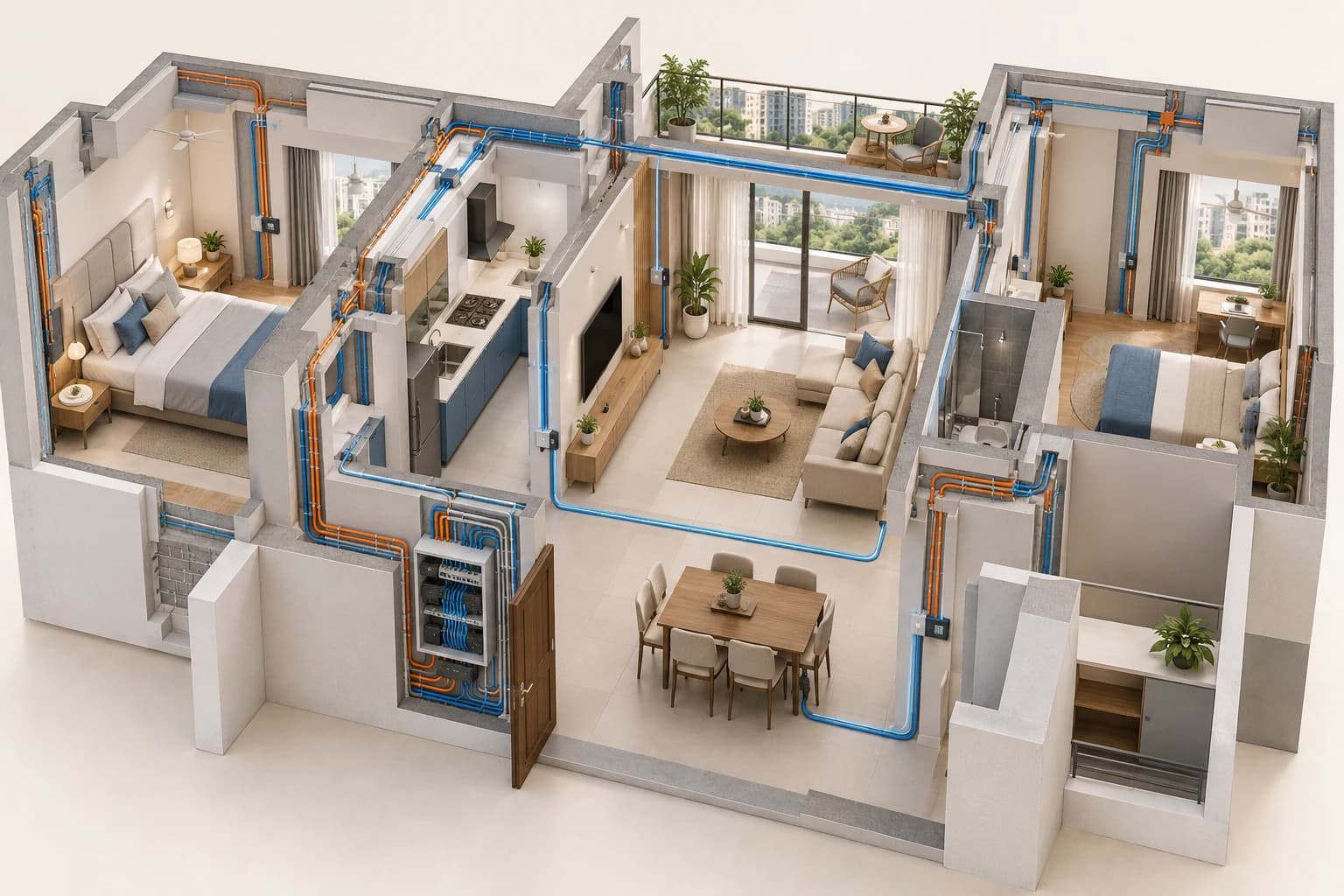
Smart-home pre-wiring is the planned electrical, low-voltage and access infrastructure that makes automation possible later. It is not the same as buying smart bulbs or installing a voice assistant. A device still needs a safe power source, a communications path, a place to be mounted and a person who can service it. In a new apartment, villa or full renovation, these decisions can be coordinated while conduits, ceilings, joinery and switch boxes are still accessible.
The useful mindset is infrastructure first, gadgets later. You may not have chosen a brand while the walls are open, and that is often sensible. A continuous neutral at the right switch points, sensible box depth, spare conduit, a reliable network route and an accessible equipment location can support more than one future system. A fashionable device cannot repair a missing conduit after the wall is painted.
This guide helps you prepare a brief for the architect, electrician, network professional and automation provider. It is not an electrical design and it is not permission to work on mains circuits yourself. The responsible professionals must determine conductor sizes, protection, separation, earthing, load limits and installation methods for the actual property and local requirements.
- Write the desired room routines before naming products.
- Mark what must work from a physical control.
- Separate mains electrical work from low-voltage data work.
- Record the construction stage and what can still change.
- Assign each decision to a named responsible trade.
Sources: [1] Studio Matrx: Smart Home Wiring guide[2] Homezee: Bengaluru pre-plaster smart-home checklist
Choose the planning path: new build, renovation or finished home
A new build gives the team the most freedom, but it also creates the biggest risk of decisions being made by different trades at different times. The architect may place a wall panel without knowing the equipment depth. The electrician may close a box before the selected control is checked. The network installer may terminate cables far from the cabinet the provider expects. A short shared points schedule prevents these gaps.
A renovation has a narrower window. Before chasing walls, photograph existing boards, confirm whether neutral conductors reach the switch locations, measure the boxes, identify the circuits and note which finishes must be protected. A wireless label does not guarantee a no-civil-work installation. Metal, concrete, distance, electrical loading, internet dependence and the need for a physical fallback still affect the design.
A finished home can often gain useful automation in stages, but the brief should be honest about constraints. A few lamps, scenes or sensors may be suitable for a light retrofit. A whole-home wired control plan, motorised shading, multi-room audio or HVAC integration may need access, containment or specialist work. Ask for an assessment before accepting a promise that the installation will require no rewiring.
- Construction stage and date of plaster or ceiling closure.
- Society, landlord or building-management permissions.
- Existing switchboard depth and neutral availability.
- Working hours, furniture protection and civil responsibility.
- Which functions are essential now and which can wait.
The electrical foundation: neutral, boxes, protection and access
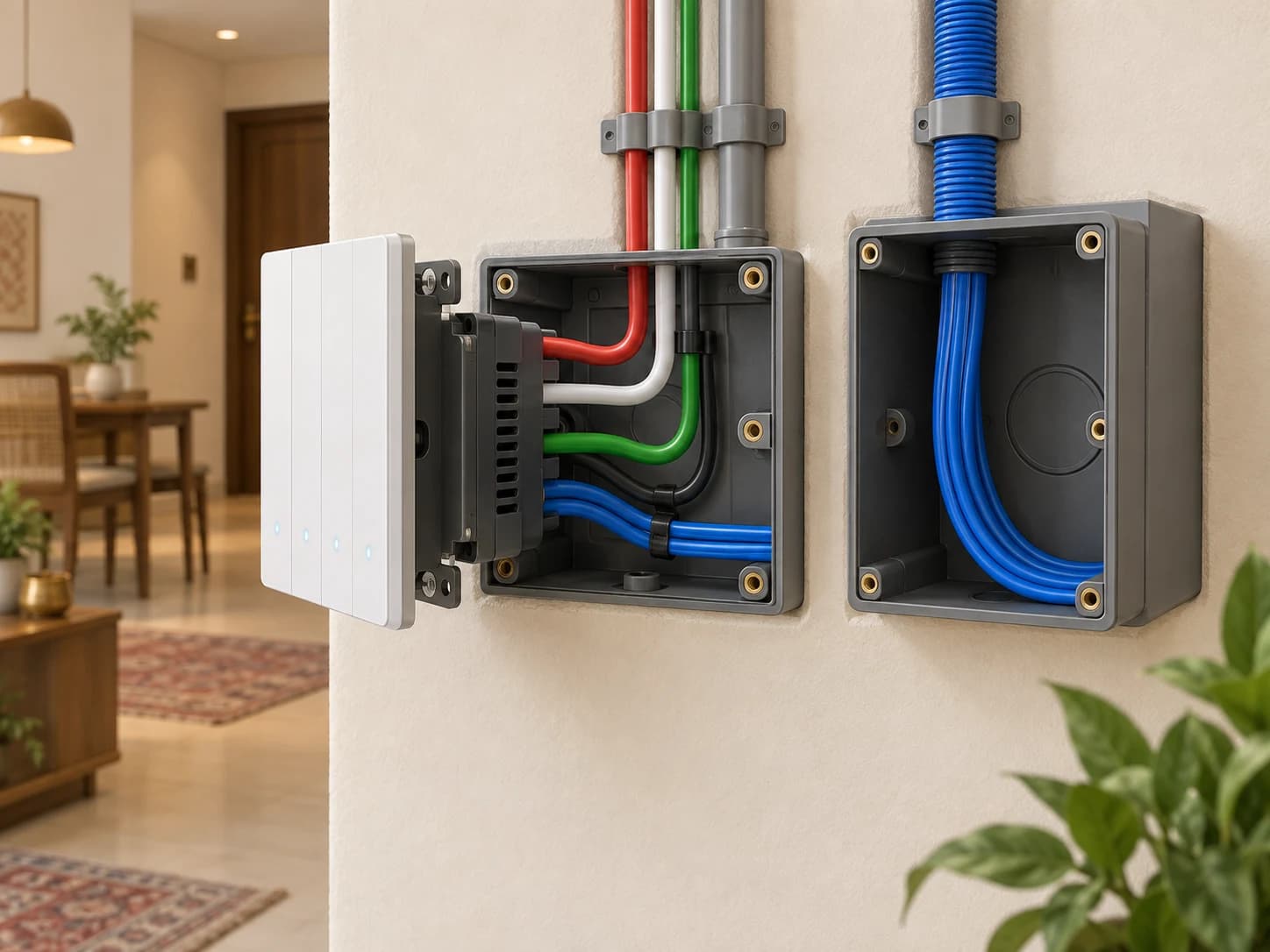
Many smart switch modules need power for their electronics even when the controlled light is off. In a conventional arrangement the switch may interrupt the live conductor while the neutral remains at the light point. That can leave the switch box without the conductor a particular module needs. Ask the electrical professional to review the actual circuit and plan the required conductors rather than assuming that a neutral-less product will suit every load.
Box depth matters because a smart module, terminal arrangement and plate can need more room than a plain mechanical switch. Do not treat a generic depth number found online as a universal specification. The ordered product, box system, wiring bend radius, heat, mounting method and local practice all matter. Have the electrician and provider check the selected installation drawing before boxes are plastered over.
Protection and access deserve equal attention. The distribution board should have a documented load schedule, appropriate isolation and protection selected by the responsible professional. Controllers, power supplies, network devices and gateways need a dry, ventilated and serviceable location. A cabinet hidden above a sealed ceiling may look tidy on handover and become a long-term support problem.
- Neutral availability confirmed at each proposed smart switch point.
- Exact box and plate dimensions checked against the model.
- Circuits, loads, isolation and protection reviewed professionally.
- Spare ways and spare conduits identified on the drawings.
- Equipment access, ventilation and service clearance shown.
Sources: [2] Homezee: Bengaluru pre-plaster smart-home checklist[3] Blackcat Automation: neutral lines and back-box planning
Build a room-by-room points schedule
A points schedule translates household routines into coordination decisions. Start with the room, then list the load or device, the desired action, the normal physical control, the network or power dependency and the responsible trade. “Living room automation” is too vague to price or inspect. “Two lighting circuits, one fan, two curtain motors, TV power and an evening scene with a wall control” is still not a design, but it gives the professionals something comparable to review.
Keep the schedule at the level the project can maintain. Include the points that affect walls, ceilings, joinery, electrical layouts or network routes. Do not add every possible sensor simply because a catalogue contains one. A smaller list of useful, well-supported routines is easier to commission, explain and repair than a large list nobody has tested.
Use room names that match the drawings and quotation. If the architect calls a space “family lounge” and the provider calls it “zone 3”, link those names in the schedule. Add a revision date. When a curtain pelmet moves or a TV wall changes, the electrical, network, interior and automation teams should be able to see which points are affected.
- Room and drawing reference.
- Load, motor, sensor or network point.
- Desired behaviour and manual fallback.
- Power, data, conduit and access requirement.
- Responsible trade, revision and open question.
Living room, bedrooms and everyday controls
The living room often contains the most visible coordination: multiple lighting circuits, fans, curtains, television equipment, speakers, access to a balcony and scenes used by guests. Mark the control locations on the furnished plan rather than placing them only by the electrical grid. A switch hidden behind an open door or blocked by joinery is technically present and practically poor. Keep at least one obvious physical way to operate essential lights.
Bedrooms need a different balance. A bedside control may be more useful than a single entrance panel, while blackout curtains, reading lights, ceiling fans and air-conditioning controls can have different schedules. Discuss the position from the bed, the door and the cleaning path. Avoid assuming that a whole-home scene belongs on every bedside control. A calm, understandable set of actions is often more valuable than a crowded interface.
For each room, explain what happens after a power interruption, a controller restart or a network outage. A scene may depend on a controller, but basic lighting should not become unusable because a cloud service is unavailable. The chosen professional must confirm the actual local and fallback behaviour of the proposed system.
Kitchen, bathrooms, utility and outdoor points
Kitchens combine high-use lighting, appliances, ventilation and safety considerations. A provider should not treat every socket or high-load appliance as an ordinary smart-switch point. The electrician must determine the appropriate circuit and control method for the actual equipment. Automation may be useful for task lighting, occupancy behaviour or a safe notification, while a heavy appliance may require a different approach or no remote switching at all.
Bathrooms and wet areas need careful product suitability, location and protection decisions. Do not move a device into a damp zone because a generic marketing page calls it smart. The responsible electrical and interior professionals should assess the environment, access and maintenance. Utility rooms and pump areas may need monitoring, but they also need clear manual isolation and a documented recovery process.
Outdoor gates, balcony shades, garden lighting and cameras introduce weather, mechanical movement, long cable routes and access questions. Show the mounting, power, drainage and service locations on the plan. For a gate or door, a reliable manual release and a recovery procedure matter more than a polished app demonstration. Ask the provider to explain what remains possible when power, internet or a mobile phone is unavailable.
- Separate high-load appliance decisions from lighting controls.
- Review damp, heat and outdoor exposure.
- Show manual isolation and recovery access.
- Coordinate gates, cameras, sensors and civil work.
- Record cleaning, service and replacement access.
Network cabling, Wi-Fi and the equipment cabinet
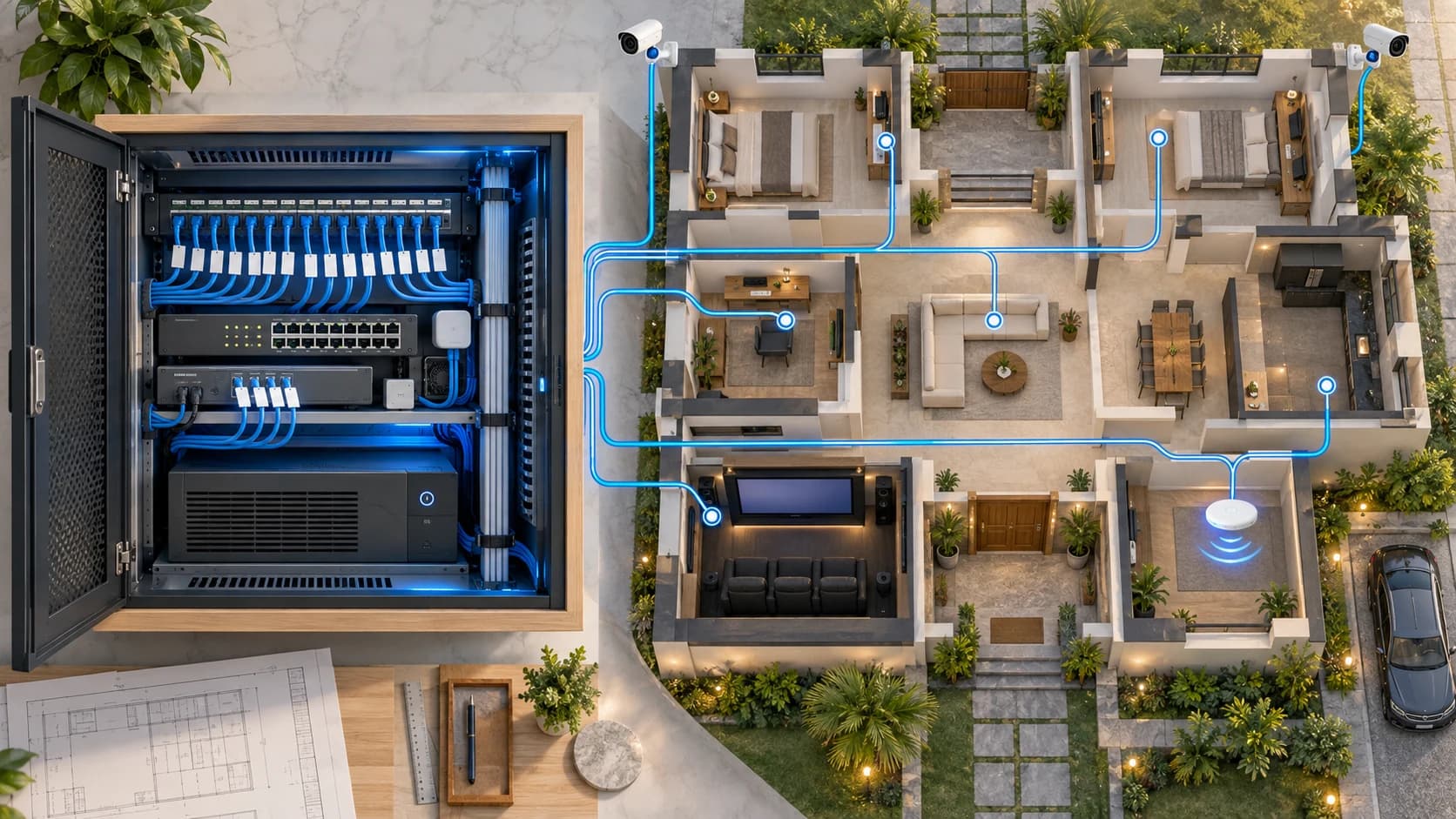
Automation is also a network project. Cat6 or another suitable structured cabling approach can provide stable links for access points, televisions, work areas, cameras, controllers and equipment that should not depend on a weak wireless signal. The right route, termination, labelling and test record matter more than putting “Cat6” on a quotation without showing where it runs.
Think in terms of a central or deliberately distributed service location. The router, network switch, patch panel, controller, gateway, UPS and power supplies need a sensible relationship. The cabinet should be dry, ventilated, reachable and large enough for the specified equipment with room for safe cable bends and future service. Do not hide active equipment in a sealed joinery pocket without checking heat and access.
Wi-Fi still matters even in a wired home. Access-point positions, concrete walls, floors, metalwork and network backhaul can affect coverage. A Thread Border Router or other gateway may need to be near the local network, while a controller may need a stable wired connection. The provider should document which devices are Wi-Fi, Ethernet, Thread, Zigbee or another technology and which bridges are required.
- Cable route, endpoint and termination location.
- Patch panel, switch, router and access-point plan.
- Rack or cabinet power, ventilation and service clearance.
- Cable labels, test results and spare capacity.
- Ownership of network accounts and configuration backups.
Sources: [1] Studio Matrx: Smart Home Wiring guide[4] Smart Home World: infrastructure for automation systems
Matter, Thread, Zigbee, Wi-Fi and KNX: what wiring can and cannot solve
Protocol language becomes useful only when it is connected to a complete system. Matter is an application protocol that can run over Wi-Fi, Ethernet and Thread. Thread is a low-power IP mesh network. Zigbee is a separate device and mesh technology. KNX is a building-control standard used in professional systems. They are not interchangeable labels, and a Matter badge does not tell you the entire controller, network, power or installation requirement.
The Connectivity Standards Alliance explains that Matter can use bridges so products using other technologies, including Zigbee or Z-Wave, can participate in a Matter ecosystem. That does not mean every bridge supports every feature. Ask for the exact device, controller, bridge, supported function and local/outage behaviour in writing. A compatibility promise should identify the model and the action you care about.
KNX and other wired systems may change the cabling and commissioning discussion, but the right choice depends on scale, routines, construction stage, support, budget and the professional design. Do not select a protocol because it appears more future-proof in a brochure. Select an outcome and ask the provider to show how the proposed system delivers it, how it can be serviced and what happens when one dependency fails.
- Name the exact device and transport, not only the ecosystem.
- Identify controller, bridge and border-router dependencies.
- Ask which functions work locally during an outage.
- Confirm the professional commissioning and handover process.
- Keep future compatibility promises separate from committed scope.
Sources: [5] Connectivity Standards Alliance: Matter FAQ[6] KNX: information for home and building owners
Power cuts, inverter, UPS and manual fallback
Indian homes often plan around power interruptions, inverter circuits and generator arrangements. The automation brief should distinguish three conditions: the mains supply is unavailable, the home has backup power but the network or controller has restarted, and the internet connection is down while local power remains. These conditions can produce different behaviour. A provider should state what is expected rather than describing all of them as “offline support”.
Decide which equipment, if any, belongs on backup power. A small controller and network device may need a different treatment from a television, amplifier, motor or high-load appliance. The electrician must assess circuits, changeover, protection, load and battery limits. Do not connect equipment to an inverter or UPS because a sales page suggests it will improve reliability; verify the actual electrical arrangement and warranty conditions.
Manual controls are part of resilience. A family member should understand how to switch essential lights, release an access point or operate a curtain when the app is unavailable. Put the fallback in the handover document and test it. A system that performs a beautiful scene but leaves the household unsure how to recover after a restart is not finished.
How architects and interior designers should coordinate the drawings
The automation brief belongs in the drawing workflow early enough to affect walls, ceilings, joinery and furniture. Mark switch and panel locations on elevations, curtain power and access on the window or pelmet detail, network points on the electrical or low-voltage plan, and cabinet dimensions on the equipment or storage drawing. A note in a mood board is not enough for an electrician to install a coordinated point.
Set review gates. One review can happen before first-fix electrical work, another before plaster or ceiling closure, and another before furniture and finishes are locked. Include the automation professional and the electrical contractor in the relevant review rather than asking the interior team to infer technical requirements from a product image. Record decisions, open issues and drawing revisions in one controlled schedule.
Protect serviceability in the design language. A clean wall is not a success if a module cannot be replaced, a network cabinet cannot be reached or a curtain motor cannot be inspected. Show removable panels, access doors, ventilation and cable routes. Agree who makes good a finish after service and whether that responsibility is included in the quotation.
- Furnished plan with control positions.
- Electrical and low-voltage points schedule.
- Curtain, gate, camera and speaker coordination.
- Cabinet dimensions, ventilation and access details.
- Drawing revisions and review sign-offs.
Sources: [1] Studio Matrx: Smart Home Wiring guide[7] Google Search Central: helpful, reliable, people-first content
What providers should include in the BOQ
A useful automation quotation makes the infrastructure visible. Ask for rooms and functions, exact equipment references, quantities, finishes, wiring or containment, network equipment, power supplies, controllers, bridges, installation, programming, testing, training, taxes, delivery, warranty, support and exclusions. A line that says “home automation package” may be acceptable as a summary, but it should be backed by the detailed scope that explains what the package contains.
Separate what is supplied by the automation provider from what is supplied by the electrician, network professional, AV team, interior contractor or builder. State where responsibility changes hands. If the quote assumes an existing neutral, a particular box, an accessible rack or a working Wi-Fi network, write that assumption beside the item. Unknowns should be marked unknown, not silently treated as included.
Use the same points schedule for every proposal. Compare the installed outcome rather than only the device subtotal. A lower number may exclude configuration, civil making-good, network hardware, curtain motors, taxes or future support. A higher number may contain optional items that are not part of your essential brief. The fair comparison begins when the providers are quoting the same functions and documenting their differences.
- Exact model, quantity, finish and room allocation.
- Electrical, network and civil work boundaries.
- Programming, scenes, integrations and commissioning.
- Tax, delivery, milestones, validity and exclusions.
- Warranty, AMC, subscriptions and service response terms.
Pre-plaster and pre-handover inspection
Before plaster or a false ceiling hides the infrastructure, walk the drawings against the site. Check that every planned box, conduit, network point, cabinet opening and curtain provision is in the intended room and is reachable. Photograph routes and label both ends of cables according to an agreed schedule. Ask the responsible professional to perform the tests required for the work; a photograph alone is not proof that a circuit or cable is correct.
At handover, inspect the installed result against the approved scope. The physical control should be in the right place, each scene should match its description, manual controls should remain usable and the provider should demonstrate recovery after an appropriate restart or outage test. Confirm who owns the accounts, which configuration records are supplied, how warranty claims are raised and what remains outside the provider's responsibility.
Keep an as-built record. It can include room names, circuits, device references, cable labels, controller location, network details, agreed exclusions, warranty documents and a dated list of open items. Credentials should be transferred securely rather than written into a document circulated among every contractor. Good records make future changes safer and reduce dependence on one person's memory.
- Walk the points schedule against the actual walls and ceiling.
- Photograph and label routes before concealment.
- Complete professional electrical and network tests.
- Demonstrate agreed routines and manual fallbacks.
- Receive as-built records, account ownership and open-item list.
India-specific planning notes for apartments and villas
The same checklist behaves differently in a high-rise apartment, an independent villa and a renovation in an occupied home. Apartments may have fixed shafts, society work-hour rules, shared risers, limited external equipment locations and restrictions on drilling or façade devices. A villa may offer more cabinet, roof, gate and network options but introduce longer routes, multiple floors, outdoor exposure and larger backup-power decisions.
City names are useful when they describe a planning context, not when they imply a guaranteed provider. A Bengaluru pre-plaster project may need a different construction sequence from a Mumbai apartment renovation; Delhi NCR villas may need careful gate, camera and society coordination; Hyderabad, Chennai, Pune, Kolkata and Tier 2 or Tier 3 locations may have different supply and service questions. Ask the actual professional to confirm current availability, qualifications, travel and support in writing.
Use the Nexoforma locations directory to describe your town or state when preparing an enquiry, but treat it as a discovery and planning route. Nexoforma does not claim that every listed location has a verified automation partner or that a request will receive multiple quotes. Your details are not automatically shared with another business; any named-provider sharing should be permissioned.
- Property type and construction stage.
- Society, landlord, builder and local access rules.
- Current electrical and network professional responsibility.
- Travel, service and replacement assumptions.
- Permission before sharing personal details with a provider.
Common mistakes and what to do instead
The first mistake is choosing panels before describing routines. A beautiful interface cannot tell you which circuits, controllers, network routes or service access the project needs. Start with daily actions and use the visual product choice later. The second is trusting the word “wireless” as a complete construction plan. Wireless devices still need power, network coverage, mounting, maintenance and a fallback when a battery or service fails.
The third mistake is accepting a BHK-based package without a points schedule. Room count does not reveal the number of lights, fans, curtains, AC units, sensors, cameras, audio zones or user roles. Ask for model numbers and quantities. The fourth is closing walls before the architect, electrician and provider agree the same drawing. A late change is often a civil change, not a settings change.
The fifth is leaving the handover until the end. Account ownership, configuration backups, cable labels, warranty route, support contact and acceptance tests should be part of the scope before payment milestones are finalised. Write down what the supplier will demonstrate and what is excluded. A clear record protects the homeowner and helps a future professional understand the installation.
Frequently asked questions
Can I make a new home automation-ready without choosing a brand? Usually, you can plan infrastructure without committing every device, but the selected professionals must confirm the compatibility assumptions. Neutral availability, box dimensions, conduit, data routes, cabinet capacity and power provisions should be designed around likely functions and any known system constraints.
Does Matter remove the need for wiring? No. Matter can simplify application-level interoperability, but compatible devices still need suitable power, network coverage, controllers or bridges. A Matter-over-Thread device depends on Thread infrastructure; a Wi-Fi device depends on the local network; a wired control system depends on its own cabling and commissioning.
Can I automate an existing apartment without breaking walls? Sometimes selected functions can be retrofitted, but the answer depends on switch boxes, neutral conductors, loads, access, network conditions, landlord or society permissions and the proposed system. Get an assessment and written scope before assuming that a wireless product means no civil work.
What should a smart-home quote include? It should identify the room-by-room functions, exact equipment, wiring and network dependencies, installation, configuration, commissioning, taxes, civil work, warranty, support, subscriptions and exclusions. Compare equivalent scopes and mark missing information as unknown.
Who should approve the wiring? The qualified electrical and network professionals responsible for the work should approve their portions. An editorial checklist can help you ask better questions, but it does not replace a site-specific design, safety assessment, local compliance review or professional installation.
Turn the checklist into a project brief
Start with the home type, city or town, construction stage and the routines that matter most. Add a room list, the existing or planned electrical condition, network expectations, backup-power context, desired manual controls and the questions you need answered. Attach drawings or photographs only after removing unnecessary personal information. A provider can assess a clearer brief more effectively than a request that says only “make my house smart”.
Use Nexoforma's project-brief tool to organise the information, the budget planner to record allowances and the quotation-comparison tool to place written proposals into the same columns. Ask Ved for a plain-language explanation of a protocol, a BOQ line or a trade-off. These tools help you prepare; they do not certify an installer, validate a price or guarantee provider availability.
When you are ready, submit a project enquiry with the information you are comfortable sharing. Nexoforma will review the request as its professional network grows. Any decision to share your details with a named provider should be clear and permissioned, and the final contract remains between you and the provider you choose.
Sources and verification
- Studio Matrx: Smart Home Wiring guide
- Homezee: Bengaluru pre-plaster smart-home checklist
- Blackcat Automation: neutral lines and back-box planning
- Smart Home World: infrastructure for automation systems
- Connectivity Standards Alliance: Matter FAQ
- KNX: information for home and building owners
- Google Search Central: helpful, reliable, people-first content
Frequently asked questions
Common mistakes and what to do instead
The first mistake is choosing panels before describing routines. A beautiful interface cannot tell you which circuits, controllers, network routes or service access the project needs. Start with daily actions and use the visual product choice later. The second is trusting the word “wireless” as a complete construction plan. Wireless devices still need power, network coverage, mounting, maintenance and a fallback when a battery or service fails.
Common mistakes and what to do instead: point 2
The third mistake is accepting a BHK-based package without a points schedule. Room count does not reveal the number of lights, fans, curtains, AC units, sensors, cameras, audio zones or user roles. Ask for model numbers and quantities. The fourth is closing walls before the architect, electrician and provider agree the same drawing. A late change is often a civil change, not a settings change.
Common mistakes and what to do instead: point 3
The fifth is leaving the handover until the end. Account ownership, configuration backups, cable labels, warranty route, support contact and acceptance tests should be part of the scope before payment milestones are finalised. Write down what the supplier will demonstrate and what is excluded. A clear record protects the homeowner and helps a future professional understand the installation.
Continue your research
Put your questions into a project brief.
Tell us your priorities and location in India. We will review your request as our professional network grows.
Plan my project →Build a free budget · Draft a project brief · Compare quotations · Check a quote with Ved
Found something that needs correcting? Tell our team. This guide is a planning checklist, not a site-specific design or electrical instruction.
← All guides